Try on clothes from any online shop
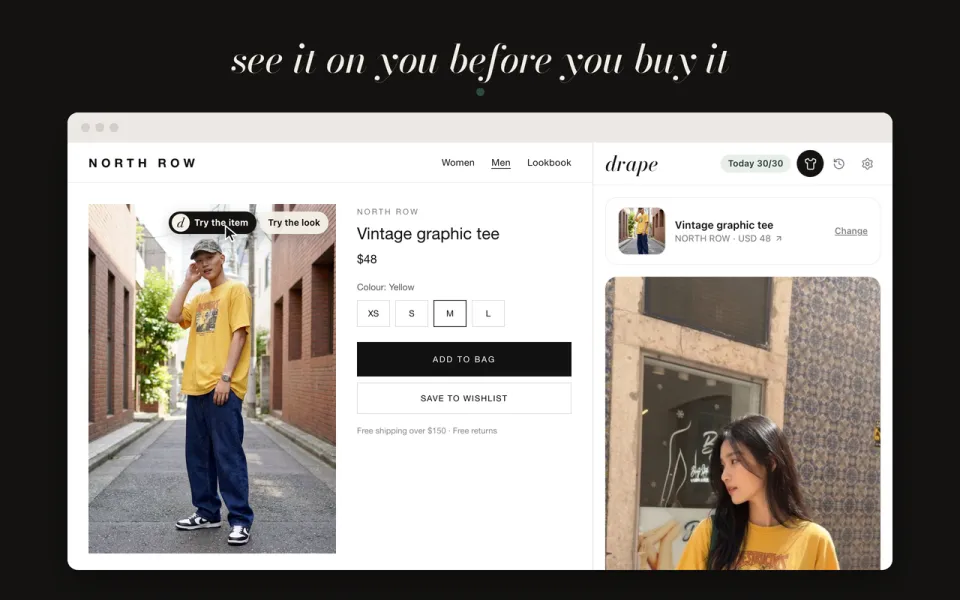
The drape extension for Chrome puts a Try on button on clothes while you shop. Pick the piece, or the whole look on the model, and see it on your own photo in a side panel, without leaving the page. It uses the same drape account and credits as the app.
Or just use drape in your browser
How it works
- Add drape to Chrome and sign in with your drape account.
- On a product page, choose Try the item for one piece, or Try the look for the model's whole outfit.
- See it on your photo, then save the pieces to your drape wishlist or keep shopping.
Good to know
- Your photo stays in the extension on your computer and is only sent to make your try-on; it isn't stored on drape's servers.
- Results go to your drape try-on history, and you can delete them there.
- The extension is for Chrome on a computer. On your phone, use the drape app.
Questions
Does it work on every shop?
It adds the button to clothing images in online shops. No button showing? Right-click the image and choose drape to try on the piece or the look.
Do I need the app too?
No, but it's the same account, so your credits, try-ons and wishlist are shared between the extension and the app.
Is the extension free?
Yes. Try-ons use the same free daily credits as the app.
More in drape
Get drape
Free on iPhone, Android and the web. You get free try-on credits every day, and adding clothes is always free.